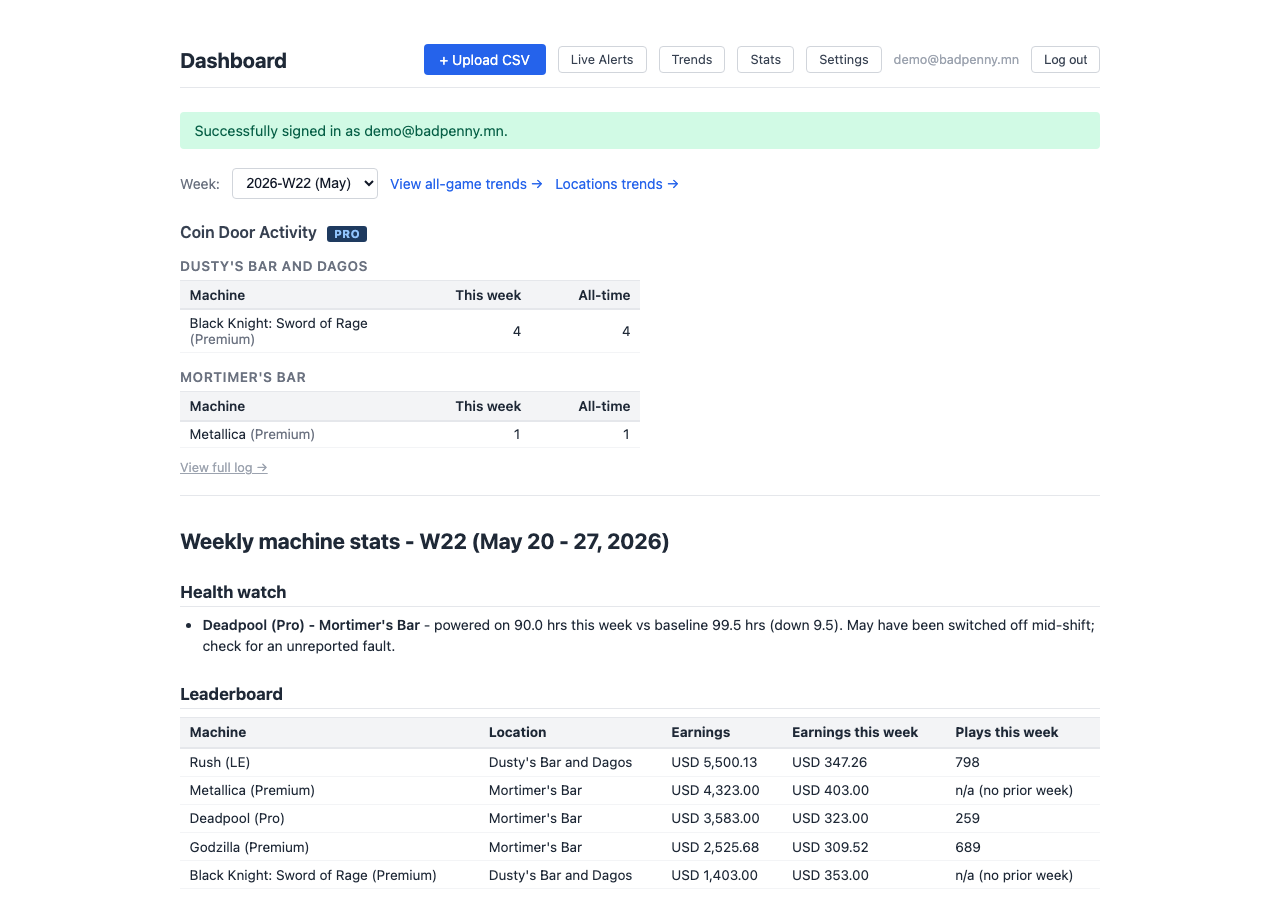
Every Stern Insider Connected™ machine on your route, by the numbers.
Bad Penny Operator Panel works exclusively with Stern Insider Connected™ pinball machines. Upload your weekly audit CSVs and get instant charts, trend lines, and health alerts. Know which machines are earning, which are struggling, and which need attention before your next collection run.
Built by an operator, for operators. No spreadsheets, no manual math. Just upload and go.
Trend charts
Week-over-week plays, earnings, and ball time for every machine on your route. Spot your earners and your underperformers at a glance.
Power-on health watch
Set expected weekly hours per location. Get flagged when a machine runs short. Catch an unplugged game before you lose a week of earnings.
Simple CSV upload
Drop in your weekly Stern audit files, one or many at a time. Duplicate detection keeps your history clean automatically.
Per-location breakdowns
View charts by venue. See which location is carrying the route and which machines are underperforming at each spot.
Earnings tracking
Optional encrypted earnings storage. Enable it to see dollar-per-week trends. Disable it and your data is immediately and permanently deleted.
Public API
Send audit data directly from scripts or your own tooling with a simple REST API. API key management is built in.
Live technician alerts
Stern fault alerts appear on your dashboard, grouped by location and machine. Resolved faults turn green once the issue clears.
Alert email digest
New faults and coin door events hit your inbox within minutes of the fetch script running. Alerts are grouped by location. Add up to 3 recipients — useful when different techs cover different venues.
Coin door security log
Every coin door open event is logged permanently per machine. A complete, tamper-evident service history for every game on your route.
Automated fetch
Our free fetch script checks for tech alerts every few hours and downloads your weekly CSV on Thursdays. No manual portal visits needed.
Two-factor authentication
Optional TOTP-based 2FA for every account. Scan a QR code with any authenticator app and your dashboard requires a second factor to access.
How it works
Up and running in minutes
No software to install, no configuration required.
Download your audits
Log in to the Stern Insider Connected Pro operator portal and download your weekly audit CSV files for each location on your route.
Upload to the dashboard
Drop one or more CSV files into the upload page. The parser handles normalization, deduplication, and encryption automatically.
Read your charts
Trend charts update immediately. Check plays, earnings, ball time, and power-on health for every machine on your route.
Want to automate it? Our free fetch script pulls tech alerts every few hours and downloads your weekly CSV automatically. Find it in the API docs after signing up. Preview the script →
Pricing
Simple, flat-rate pricing
One flat rate. Every Stern Insider Connected™ machine on your route, every week.
14-day free trial
Route Operator
$5 / month
No credit card required to start.
Unlimited machines and locations
Full season trend history
Configurable power-on health watch
Optional encrypted earnings tracking
Optional two-factor authentication (2FA)
Public REST API and free fetch script
Access to Discord channel for help, suggestions and updates